Lesson 15 of 15
Showing the score on a TV
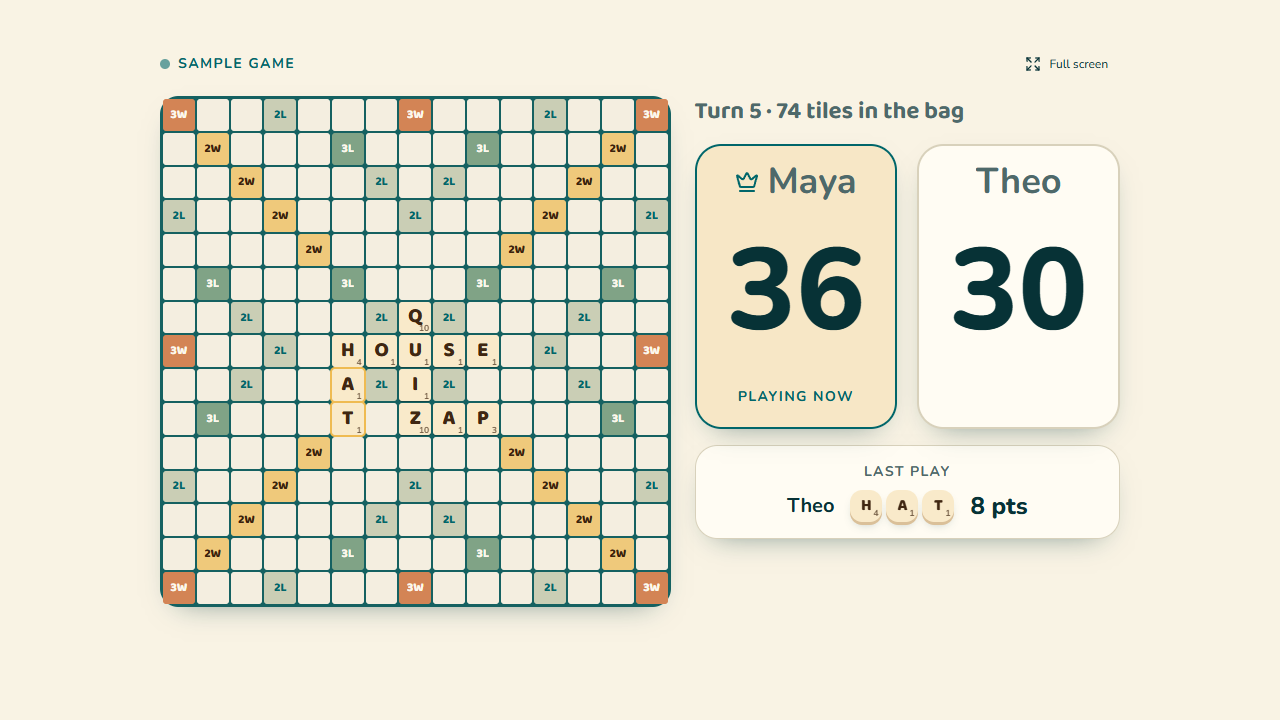
Show on TV puts the game on a bigger screen: big scores, a crown on the leader, whose turn it is, the last play and, if you score on the board, the board itself. It updates by itself the moment you save a turn on your phone. It's part of Tileside Pro.
- 1On your phone, during a game, tap Show on TV, then Show on TV again in the panel that opens. You get a 6-letter code and a QR code.
- 2On the TV, open its web browser, go to tileside.app/live and type the code with the remote. Or scan the QR code with any phone or tablet.
- 3Keep scoring on your phone as usual. The TV catches up after every turn, all evening, even when you start a new game.
Forgot what a word means? Table words
Looking for a rule? How to Play has them all
Free scoring guide for your next game
A one-page printable of tile points, bonus squares and how a turn scores. Download it right away. Then two short welcome emails (three scoring habits, then what Tileside Pro adds), and about once a month, a little more around the holidays: a word to know and a tip that scores.
Word list: NASPA Word List 2023, used under license. NASPA Word List 2023 Edition © NASPA 2023. The copy included in this app is licensed for personal use. You may not use it for any commercial purposes.